

















Android Car System Version Unknown? Find the MCU, Build Number and Motherboard
Use original FixMyDash videos and real system screenshots to check your Android car system version, identify Topway TS20, TS18 and TS10, FYT, XY-AUTO, NWD and HC/MTK platforms, and prepare the correct information before firmware repair, feature activation or software upgrade.
Android car system version Information is the first thing to check when you cannot identify an Android head unit. This guide shows how to find the Android version, MCU version, CPU platform, build number, AppVer and motherboard family before buying firmware, voice-control software, launcher themes or feature activation.
All platform videos and screenshots on this page were created from FixMyDash test units and real Android head unit interfaces. Menu names can vary by firmware, so use the platform identifiers and version formats together rather than relying on screen appearance alone.
How Do I Check My Android Car System Version?
The exact Android car system version helps FixMyDash distinguish between similar-looking units and review whether a firmware file, MCU package, launcher, voice assistant or feature activation is suitable for the installed platform.
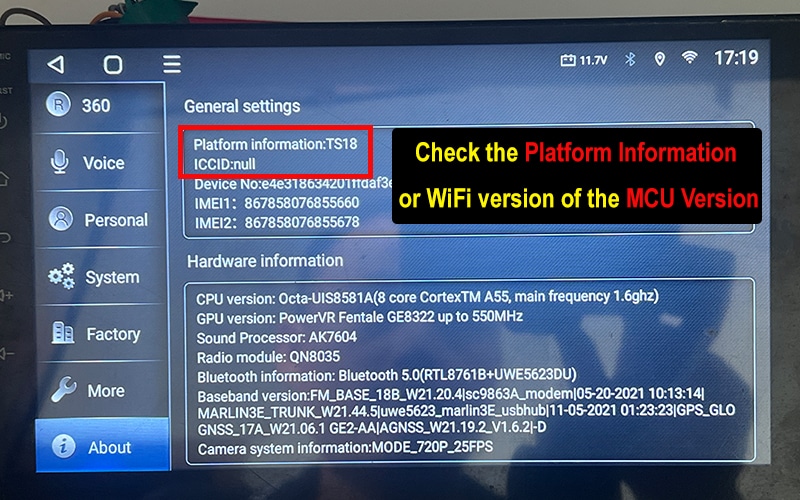
Use three checks: inspect the rear product label, inspect the motherboard markings when accessible, and open the system information page. The most useful screenshots normally show Android version, MCU, CPU or platform name, build number and application version.
Do not identify compatibility from the vehicle model, screen size or displayed Android version alone. Two units with the same interface can use different motherboards, firmware builds and software packages.
Android Car System Version Information to Collect Before Repair or Activation
Newer Android Head Unit Platform Identifiers to Check
Android head unit naming is not standardised. Sellers may advertise a CPU name, motherboard family, firmware family or marketing model as though they were the same thing. Use the names below as clues for identification, then confirm the complete System Info, MCU and build number before installing software.
| Platform family | Current and newer identifiers commonly encountered | Important verification |
|---|---|---|
| Topway / TS family | TS7, TS10, TS18, TS20, T133 and A100 | Confirm the full TS/TX version string, MCU and installed Topway package. Similar TS names can use different firmware. |
| FYT / UNISOC family | SC9853i, UIS7862, UIS7862S, UIS8581A, UIS7870, UIS7870S, UIS7870SC and UIS9863 | Confirm CPU Version, manufacturer code, MCU and FYT app framework. The SoC name alone does not identify the exact firmware package. |
| XY-AUTO family | 8227L, 9211A/B/C, 9212, 9216, 9255 and some 8259-series identifiers | Check the complete build string and MCU. Seller names can mix CPU, board and firmware labels. |
| NWD / K-series family | K2000N, K2001N, K2501, P13 and related K-series variants | Use AppVer and the full K-series version string. Do not identify firmware from the launcher appearance. |
| HC / MTK family | AC8227L, AC8257, AC8259, AC8275, AC8163, MT8163 and MT8667 | Confirm whether the displayed value is the SoC, board family or firmware name, then note down the MCU and build number. |
Android Head Unit Platform Identification Table
| Platform | Common identifiers | System field to check | Common model families | Factory password examples |
|---|---|---|---|---|
| Topway | TS, TX, Topway system information | System Information / MCU / Platform Information | TS7, TS10, TS18, TS20, T133 and A100 | 123456 |
| FYT | UI, UIS, FYT CPU version strings | CPU Version / About Device | SC9853i, UIS7862, UIS7862S, UIS8581A, UIS7870, UIS7870SC, UIS9863 | 3368 |
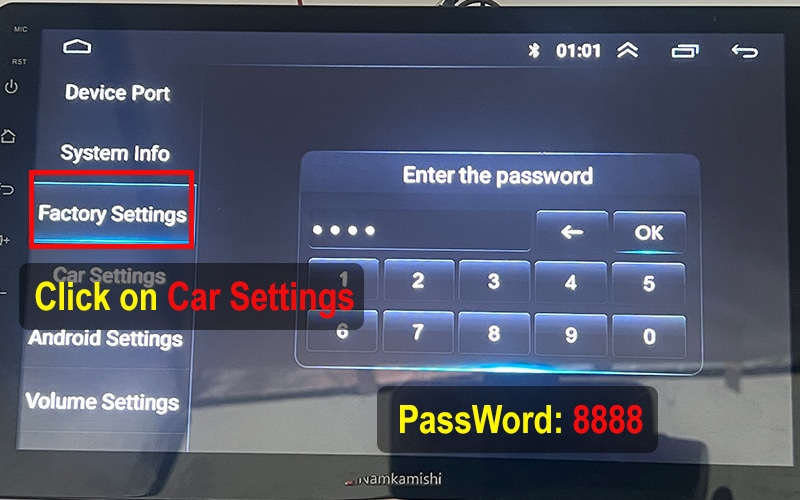
| XY-AUTO | 9XXXA/B/C and XY-AUTO build formats | System Information / Android Version / Build | 8227L, 9211A/B/C, 9212, 9216, 9255, 8259-series identifiers | 8888 |
| NWD | KXXXN, K2000N and AppVer strings | AppVer / System Setting | K2000N, K2001N, K2501, P13, related K-series variants | 1617 |
| HC / MTK | AC8XXX, AC8227L and related build strings | Android / About Device / Build | AC8227L, AC8257, AC8259, AC8275, AC8163, MT8163, MT8667 | 0000 / 000000 / 879000 |

Topway Android Head Unit Identification
Factory password example: 123456Topway systems commonly include TS7, TS10, TS18, TS20, T133 and A100 families. Confirm the platform from the System Info page and version string rather than the launcher appearance.
Topway System Information Tutorial
-
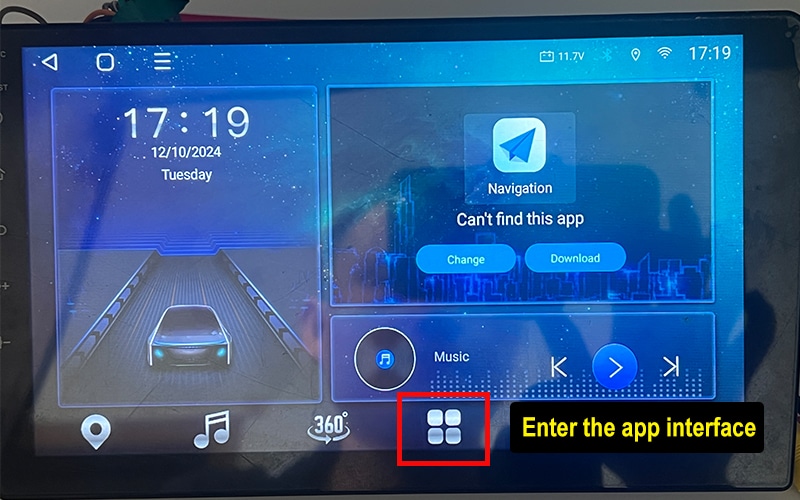
Open the app screen
![Topway app screen]()
-
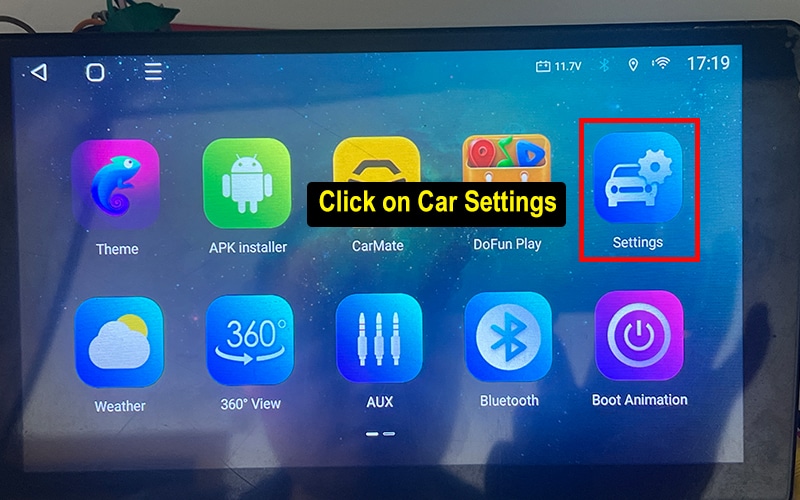
Open Settings and select About
![Topway car settings screen]()
-
Photograph Platform Information, MCU and build information
![Topway platform information and MCU version]()
Topway Factory Settings Tutorial
-
Open the app screen
![Topway app screen before Factory Settings]()
-
Open the car Settings menu
![Topway Settings menu]()
-
Record the current values before changing anything
![Topway current platform settings]()

FYT Android Head Unit Identification
Factory password example: 3368FYT platforms often show the motherboard family through CPU Version or About Device. Common families include SC9853i, UIS7862, UIS7862S, UIS8581A, UIS7870, UIS7870SC and UIS9863.
FYT System Information Guide
-
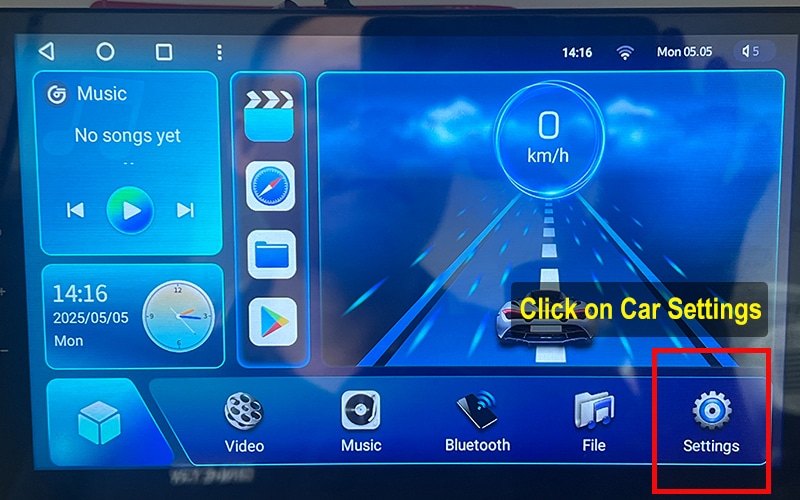
Open the car Settings icon
![FYT car settings]()
-
Select System and open About Device
![FYT About Device menu]()
-
Check CPU information and identify the FYT version string
![FYT CPU version and motherboard information]()
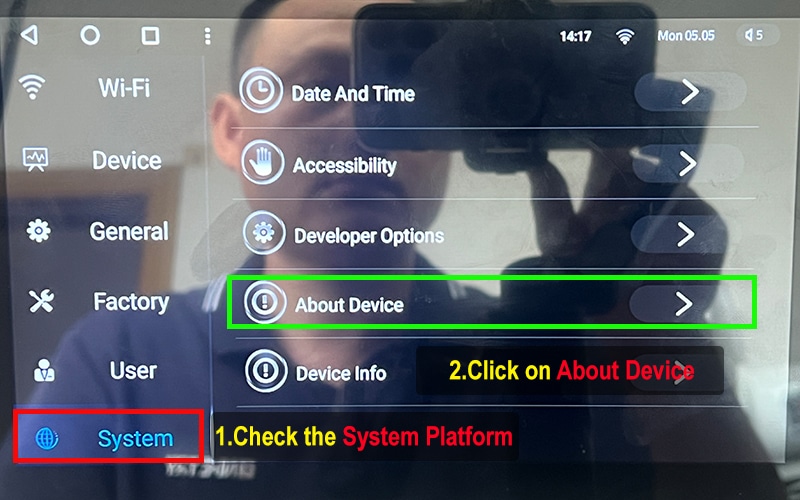
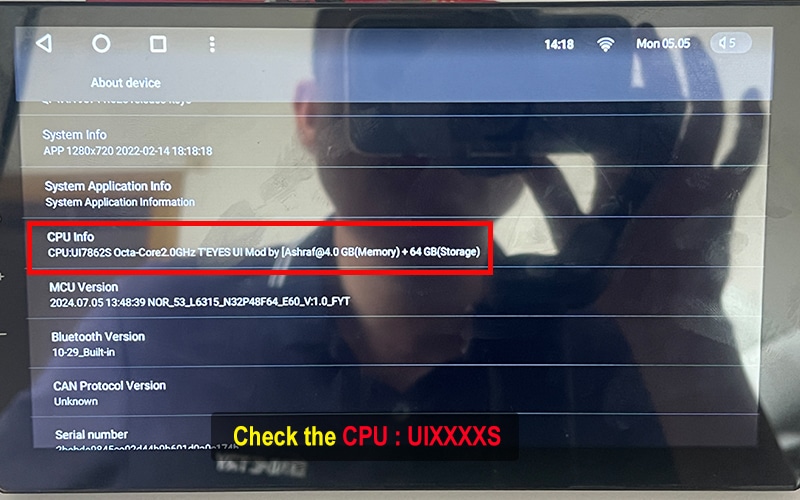
FYT Factory Settings Guide
-
Open Factory and enter the supported password
![FYT factory password screen]()
-
Take a photo of the current Factory Settings before making any changes
![FYT Factory Settings panel]()
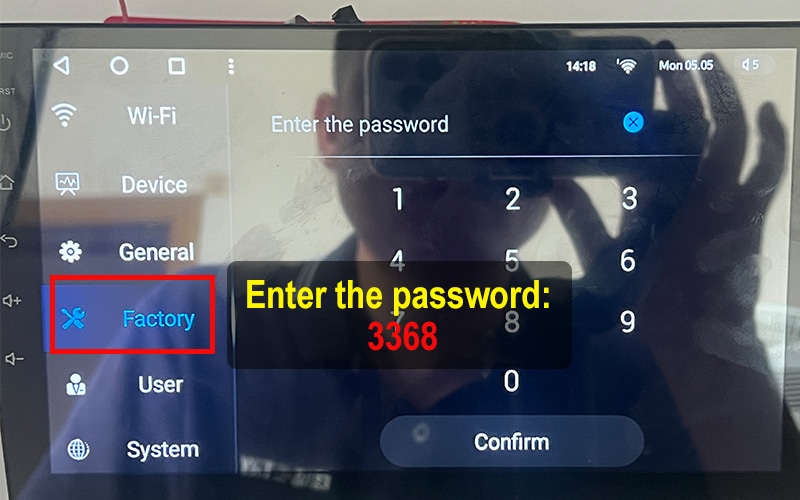
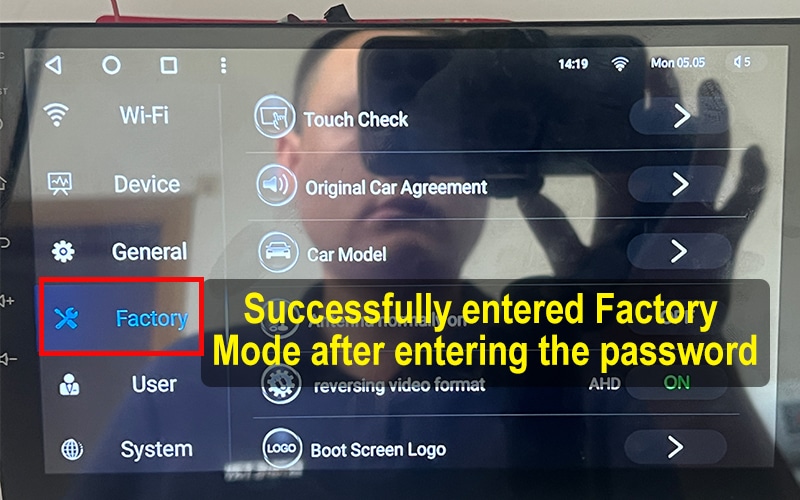

XY-AUTO Android Head Unit Identification
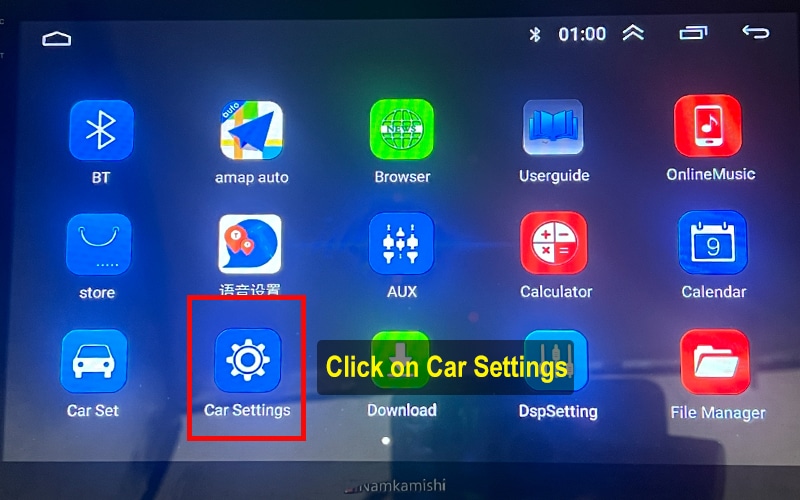
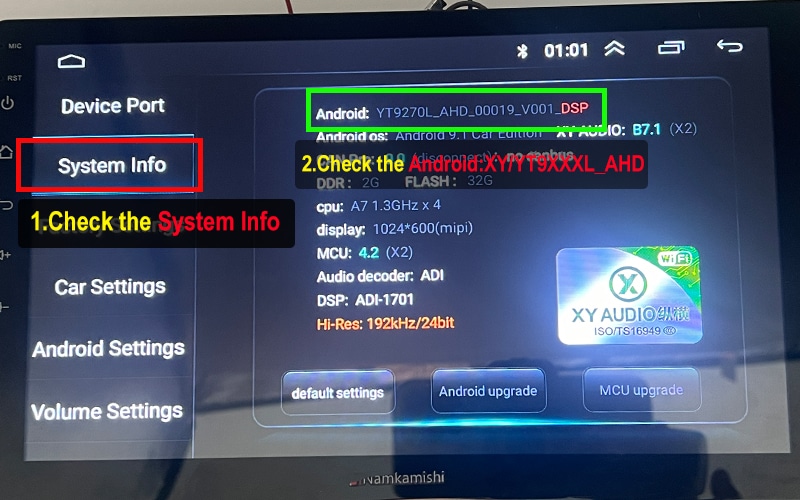
Factory password example: 8888XY-AUTO systems often use 9XXX-style version strings. Common product families include 8227L, 9211A/B/C, 9212, 9216, 9255 and some 8259-series identifiers.
XY-AUTO System Information Tutorial
-
Open the car Settings menu
![XY-AUTO vehicle settings]()
-
Open System Info and photograph the Android version and build details
![XY-AUTO system version information]()
XY-AUTO Factory Settings Tutorial
-
Open Factory and enter the supported password
![XY-AUTO factory password screen]()
-
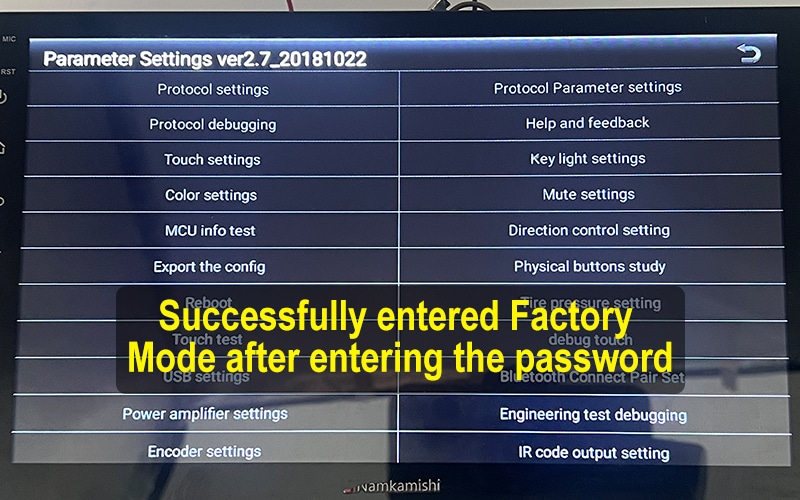
Photograph the current Factory Settings panel
![XY-AUTO Factory Settings interface]()

NWD Android Head Unit Identification
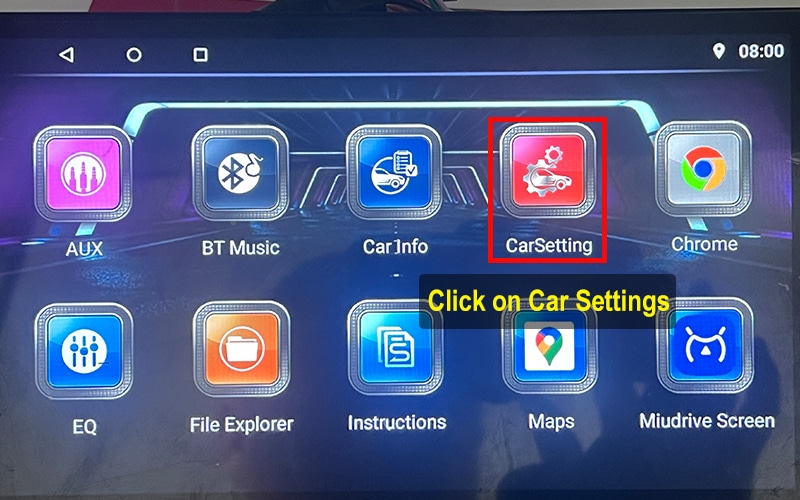
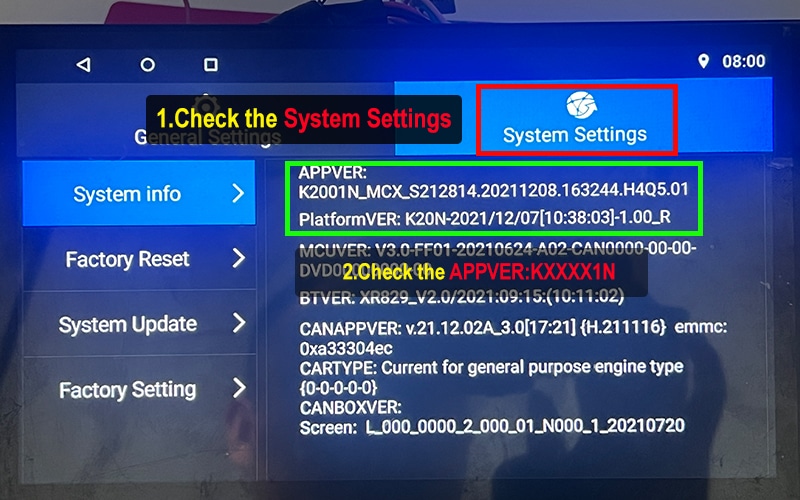
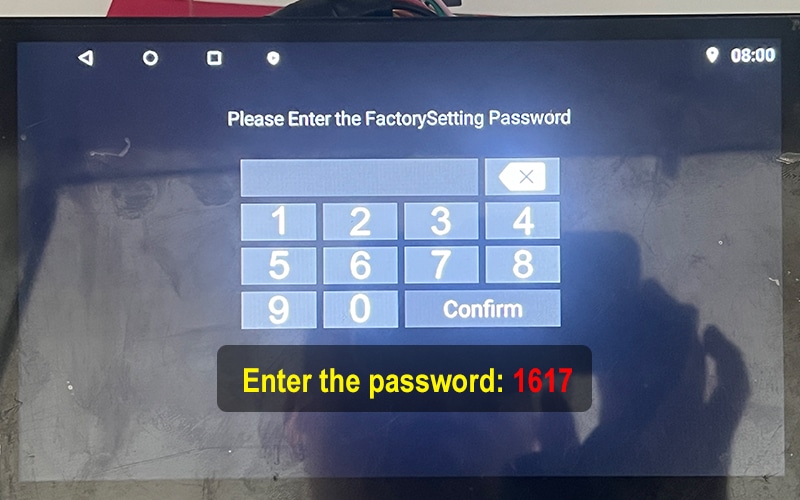
Factory password example: 1617NWD platforms commonly expose the system family through AppVer. K2000N, K2001N, K2501, P13 and related K-series identifiers are common examples.
NWD System Information Tutorial
-
Open the car Settings icon
![NWD vehicle settings]()
-
Open System Settings and photograph AppVer
![NWD AppVer system information]()
NWD Factory Settings Tutorial
-
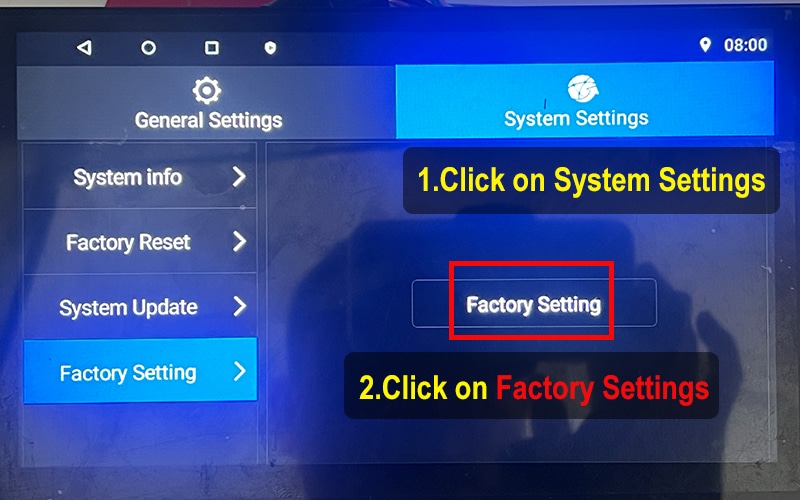
Open System Settings and select Factory Setting
![NWD factory settings menu]()
-
Enter the supported factory password
![NWD factory password]()
-
Photograph the Factory Settings page before changing anything
![NWD Factory Settings page]()

HC / MTK Android Head Unit Identification
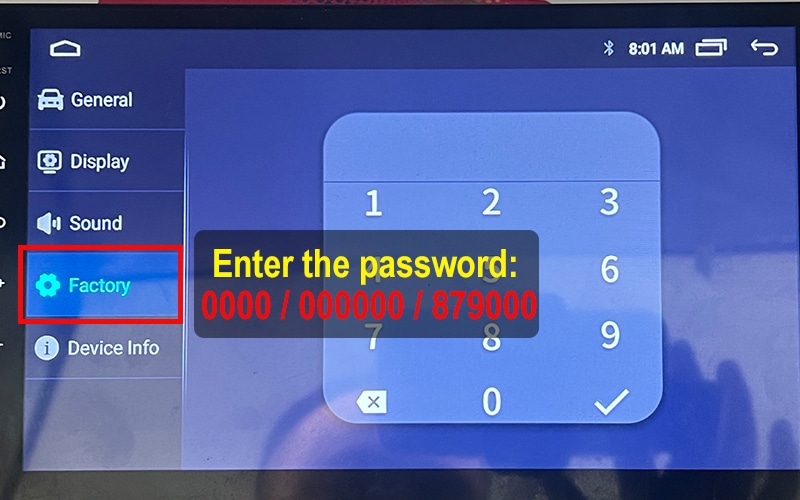
Factory password examples: 0000 / 000000 / 879000HC and MTK systems may display AC8XXX-style version strings. AC8227L, AC8257, AC8259, AC8275, AC8163, MT8163 and MT8667 are common platform references.
HC / MTK System Information Tutorial
-
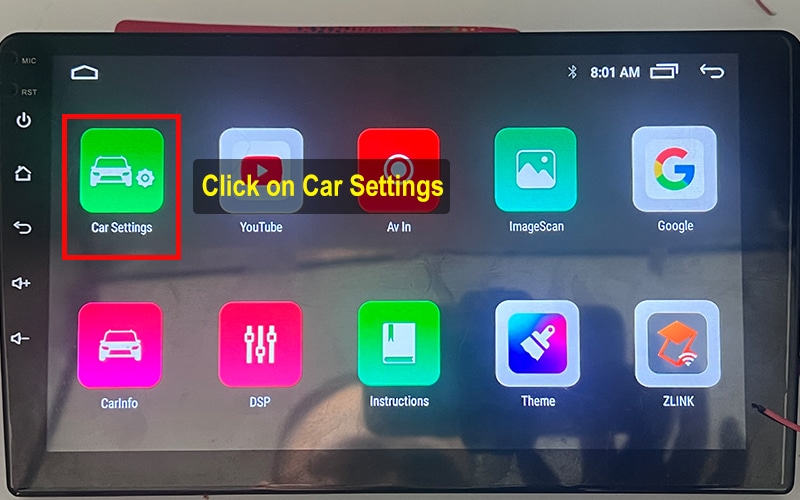
Open the car Settings icon
![HC MTK car settings]()
-
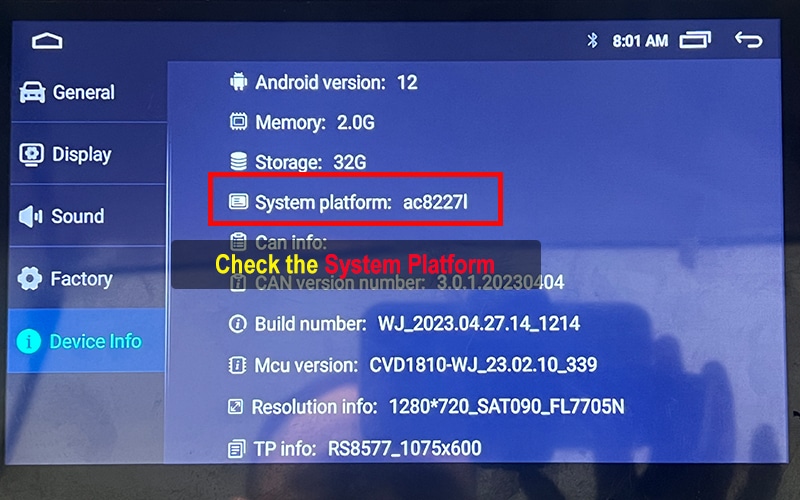
Open About Device and take a photograph of the Android and build information
![HC MTK Android system version]()
HC / MTK Factory Settings Tutorial
-
Open Factory and enter the supported password
![HC MTK factory password]()
-
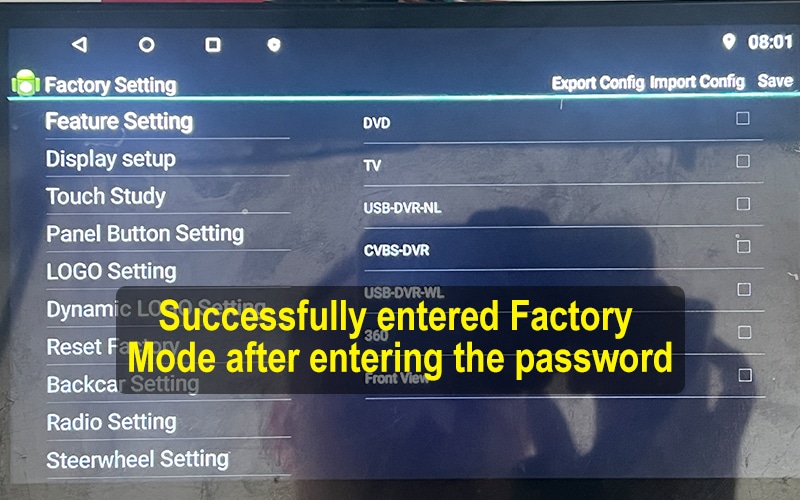
Take a photograph of the current Factory Settings page
![HC MTK Factory Settings page]()
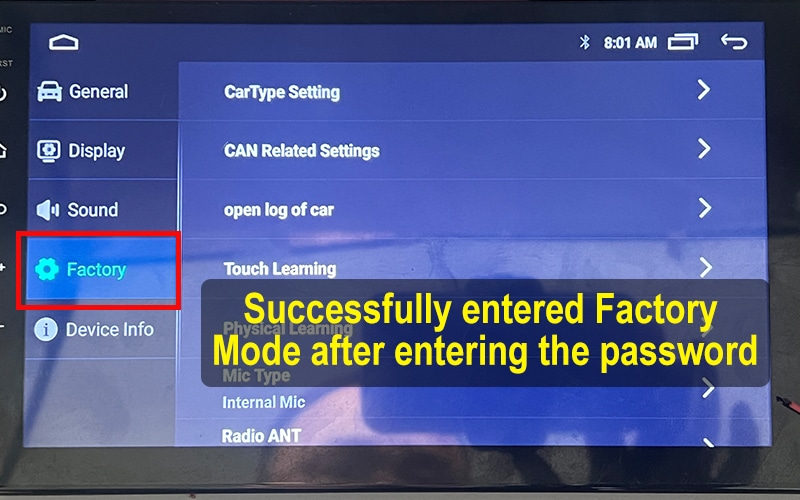
Factory Settings Safety Rules
| Usually safe | Use caution | Do not change without evidence |
|---|---|---|
| Open the menu, take a photograph of the settings and record version information. | Change one confirmed value at a time and keep the original screenshot. | CAN protocol, amplifier type, display resolution, radio region, camera format or MCU package. |
More Tips for Android Car System Users
Whether you use a Topway TS20, Topway TS10 or TS18, XY-AUTO 9216, an FYT UIS7862 or UIS7870, an NWD K-series unit, or an HC/MTK platform, checking the Android head unit system version is the first step before buying firmware, launcher themes, voice-control software or activation of supported features.
FixMyDash provides Android head unit firmware repair, activation of feature, compatibility review and system-upgrade support for selected platforms. Common identifiers include Topway TS10, TS18 and TS20; FYT SC9853i, UIS7862, UIS7862S, UIS8581A and UIS7870-series; XY-AUTO 8227L and 9211/9212/9216 families; NWD K2000N, K2001N and K2501; and HC/MTK AC8227L, AC8257, AC8259 and related build families.
Use the original videos and screenshots on this page to check the Android head unit MCU version, CPU or platform name, build number, AppVer and Factory Settings path. This information is required for an accurate Android head unit compatibility check before purchasing iLauncher Pro, Toppal Voice, Dofun Voice Assistant, boot-logo activation, supported CarPlay or Android Auto upgrades, or other software services.
Platform names are only identification clues. A matching CPU or motherboard label does not prove that two units can use the same firmware, MCU file or APK package. FixMyDash reviews the complete system information before recommending a repair, activation or upgrade path.
Use Your System Information to Choose the Correct FixMyDash Service
Why this guide is different
This page is based on FixMyDash test units, original interface recordings and real platform screenshots. The purpose is not to guess a motherboard from a launcher image, but to show the exact evidence needed before software repair, firmware matching or feature activation.
Send the correct Android head unit information before ordering
Prepare the Android car system version page, MCU version, CPU or platform name, build number and current error or activation screen. This reduces incorrect software matching and avoids unnecessary purchases.

2 коментарі до “Android Car System Version Unknown? Find the MCU, Build Number and Motherboard”
ive been trying to get my download apk i have sent you picks of my system and havent got anything i dont use whats app and do not want it on my phone i do want my files i have a FYT Motherboard
hi,cheack your email.