














Toppal Voice Demo and Language Support
Watch real Toppal Voice demo videos in multiple languages, compare Standard and Pro functions, and review Android head unit compatibility before choosing an activation option through FixMyDash.
Individual customers can review current activation options on the product page. Installers, dealers, workshops and bulk purchasers can contact FixMyDash directly through WhatsApp.
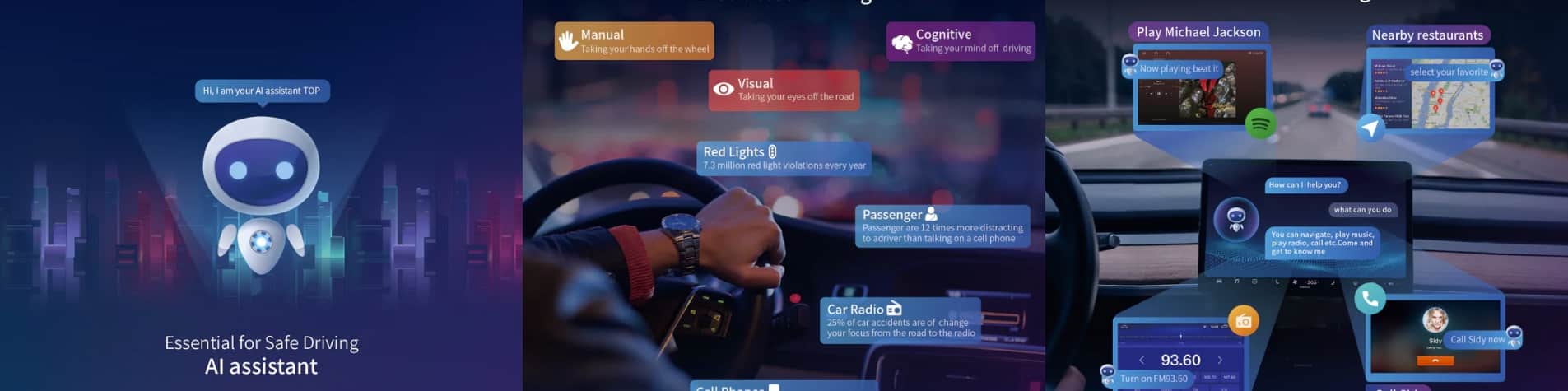
Review the Toppal Voice interface and general voice interaction before purchase.
Огляньте платформу, прошивку, встановлену програму та екран активації.
Порівняйте Toppal Voice Standard і Pro перед вибором варіанта активації.
Пряма підтримка для установників, дилерів, реселерів і замовлень на кілька пристроїв.
Чіткі відповіді перед активацією
Ця спеціальна сторінка допомагає покупцям переглянути реальні демонстрації, підтримувані мови, відмінності між Standard і Pro, вимоги сумісності та правильний шлях купівлі перед оформленням замовлення.
Так. Центр демо-версії Toppal Voice FixMyDash надає записані демонстрації англійською, італійською, французькою, португальською, арабською, російською, німецькою, індонезійською та тайською мовами.
Сумісність залежить від встановленого застосунку Toppal, платформи головного пристрою Android, прошивки, інтерфейсу активації та поточного програмного середовища. Лише версії Android недостатньо як доказ.
Стандарт зазвичай призначено для звичайних підтримуваних команд. Версії Pro або Connected можуть забезпечувати ширше онлайн-розпізнавання та розширені функції застосунків, музики, дзвінків або мультимедіа, де це підтримується.
Деякі локальні команди можуть працювати без постійного інтернету. Онлайн-розпізнавання, хмарна обробка та підключені сервіси потребують стабільного інтернет-з’єднання.
A factory reset or firmware update may change the installed application, application version or activation environment. The current system information should be checked again.
Individual customers can review current Toppal Voice activation options through the FixMyDash product page after checking compatibility.
Yes. FixMyDash supports car stereo installers, Android head unit dealers, workshops, resellers and businesses managing multiple compatible devices.
Watch Toppal Voice Demo Videos
Select a language and watch the recorded voice interaction. These Toppal Voice video demos help buyers review the interface, language experience and general command response before choosing an activation option.
Choose the Correct Next Step
Ця сторінка містить демонстрації та рекомендації перед покупкою. Окремі варіанти активації Toppal Voice, перевірка сумісності та підтримка масової активації Toppal здійснюються через окремі канали.
Переглянути варіанти активації Toppal Voice
Suitable for an individual Android head unit owner who needs a compatible Toppal Voice activation option with setup guidance.
View individual activation optionsCheck Toppal Voice Compatibility
Review the installed application, platform, firmware and activation screen before selecting Standard, Pro or another supported route.
Review compatibility requirementsRequest Bulk Toppal Activation Support
Suitable for installers, Android head unit dealers, workshops, resellers and businesses managing multiple compatible devices.
Contact FixMyDash on WhatsAppToppal Voice Supported Languages
Toppal Voice language support can vary by application version, activation option, firmware, language package and Android head unit platform. Confirm the required language before purchase.
European
-
 Англійська мова
-
 Spanish
-
 Portuguese
-
 French
-
 German
-
 Italian
-
 Russian
-
 Ukrainian
-
 Польська
Asian
-
 Mandarin Chinese
-
 Cantonese
-
 Traditional Chinese
-
 Japanese
-
 Korean
-
 Thai
Thai
-
 Vietnamese
-
 Indonesian
-
 Малайська
-
 Hindi
Hindi
-
 Filipino
Middle Eastern
-
 arabski
-
 Hebrew
-
 Turkish
Підтвердження мови: Мова, показана в одній версії Toppal Voice, не означає автоматично, що вона доступна на кожному Android головному пристрої. Перевірте встановлену програму та вибрану опцію активації перед покупкою.
Toppal Voice Standard vs Pro
Це порівняння пояснює загальну різницю між звичайними локальними голосовими функціями та розширеними підключеними голосовими функціями.
| Capability | Standard | Pro / Connected |
|---|---|---|
| Routine local commands | Supported where available | Supported where available |
| Керування навігаційним застосунком | Базова підтримка команд | Базові та розширені команди |
| Керування музикою та медіа | Відтворення, пауза та підтримувані базові команди | Розширені функції музики, медіа та пошуку, де підтримується |
| Голосове керування додатками | Обмежені або попередньо визначені команди | Розширене керування застосунком, де підтримується |
| Bluetooth-дзвінки | Базові підтримувані команди дзвінків | Розширені функції дзвінків, де підтримується |
| Онлайн-розпізнавання | Не є основною функцією | Доступно, де підтримується |
| Розпізнавання природних фраз | More dependent on fixed command formats | Broader recognition where connected services are supported |
| Потрібен інтернет | May not be required for supported local commands | Required for online recognition and connected functions |
| Best suited for | Routine daily voice-control requirements | Users requiring expanded connected voice functions |
Selection rule: Do not select Standard or Pro based only on the version name. The installed application, activation interface, platform, firmware and required functions should be reviewed first.
How Toppal Voice Compatibility Is Reviewed
The review process reduces the risk of choosing an unsuitable activation option based only on a generic Android version, processor claim, marketplace listing or head unit model name.
Надіслати системну інформацію
Provide the Android system page, the installed Toppal application screen and the current activation interface.
Review Compatibility
FixMyDash reviews the visible platform, firmware, installed application and activation status.
Select the appropriate route
Compare Standard, Pro, renewal, re-activation or multiple-device requirements.
Complete the Next Step
Use the FixMyDash product page for individual orders or WhatsApp for bulk activation enquiries.
Information Needed Before Activation
Current device screenshots are more reliable than old marketplace listings or broad descriptions such as “Android 13 radio,” “8-core head unit” or “TS10 system.”
Factory Reset and Firmware Update Considerations
An existing activation result should not be assumed to remain unchanged after the Android head unit software environment is modified.
Bulk Toppal Activation Support for Installers and Dealers
FixMyDash підтримує установників автомобільних магнітол, дилерів Android-головних пристроїв, майстерні, реселерів і компанії, яким потрібна підтримка активації Toppal для кількох сумісних пристроїв.
Bulk requests are reviewed according to the estimated quantity, Android head unit platform, installed Toppal version, required language, preferred version and support scope. One activation method should not be assumed to work across every device.
For a bulk Toppal activation order, contact FixMyDash directly through WhatsApp and provide the available device information. Bulk quotations are based on quantity and compatibility requirements and are not displayed on this page.
Prepare the estimated quantity, platform, installed Toppal version, required language, Standard or Pro preference and required functions.
Multiple-Device Orders
Coordinate activation requirements for several compatible Android head units in one request.
Installer and Dealer Support
Suitable for car stereo installers, Android head unit dealers, workshops and resellers.
Platform and Version Review
Device lists, system screenshots and installed Toppal versions can be reviewed before order confirmation.
Language Requirements
Confirm the required language and whether all devices require the same language option.
Quantity-Based Quotation
Bulk quotation depends on quantity, version, platform, language and compatibility requirements.
Business Support Scope
Clarify whether the request includes only activation or also compatibility review and setup guidance.
Demonstration, Review and Support in One Place
FixMyDash combines real demonstrations, compatibility checking, version guidance, individual purchase support and bulk-order coordination instead of asking buyers to select an option from a product name alone.
Toppal Voice Demo FAQ
Can I watch a Toppal Voice demo before purchasing?
Так. Ця сторінка містить записані демонстрації англійською, італійською, французькою, португальською, арабською, російською, німецькою, індонезійською та тайською мовами, щоб покупці могли ознайомитися з інтерфейсом перед вибором варіанту активації.
Які мови включено до демо-центру FixMyDash ?
The current demo selector includes nine recorded languages: English, Italian, French, Portuguese, Arabic, Russian, German, Indonesian and Thai.
Will Toppal Voice work on every Android head unit?
No. Compatibility depends on the installed application, platform, firmware, activation interface and current software environment. The Android version alone does not confirm compatibility.
What is the difference between Toppal Voice Standard and Pro?
Standard is generally intended for supported routine or local commands. Pro or Connected versions may provide expanded online recognition, application control, music search, calling and connected functions where supported.
Does Toppal Voice work without internet?
Some supported local functions may work without continuous internet. Online recognition, cloud processing and connected services require a stable internet connection.
What information is required for a Toppal Voice compatibility check?
Provide the Android system information screen, installed Toppal application screen, current activation interface, required language, required functions and any recent factory reset or firmware update history.
Where can I view individual Toppal Voice activation options?
Individual customers can review current activation options through the FixMyDash Toppal Voice product page .
How do I request support for bulk Toppal activation?
Installers, dealers, workshops, resellers and businesses can contact FixMyDash directly through WhatsApp with the estimated quantity, platform, installed Toppal version, required language and preferred version.
What happens after a factory reset or firmware update?
The installed application, permissions, software version or activation environment may change. The current system information, Toppal screen and activation interface should be reviewed again.
Can one activation method be used on every Android head unit?
No. Different platforms, firmware versions and Toppal application versions may require different activation routes. This is particularly important for bulk orders.
Is FixMyDash the official Toppal website?
No. FixMyDash is an independent Android head unit software support provider offering demonstrations, compatibility review, activation guidance and setup support.
Review the demos and choose the correct purchase route
Individual customers can use the product page. Installers, dealers, workshops and bulk buyers can contact FixMyDash directly via WhatsApp.
FixMyDash is an independent Android head unit software support provider. Toppal is third-party software and a trade mark belonging to its respective owner. Demo functions, language support and compatibility may vary by Android head unit platform, firmware, application version, permissions, language pack and connection status.