

















Is My Device Compatible with Toppal Voice?
Toppal Voice is an advanced Android car voice assistant designed specifically for Android-based car head units. This guide provides a complete overview of compatibility requirements, activation steps, user experience, troubleshooting tips, and licensing policies. If you’re considering installing Toppal Voice, this article will help you determine whether your current Android car stereo setup supports it—and how to activate it properly.What is Toppal Voice?
Toppal Voice is an AI-powered assistant that allows hands-free driving control of your in-car system. From playing music to launching navigation or getting weather updates, it supports voice commands in multiple languages, enhancing driving safety and convenience. Once installed, Toppal Voice integrates seamlessly with your head unit interface and can work both online and offline for basic commands.System Requirements
- Android operating system (Android 9.0 or later recommended)
- Support for Wi-Fi and mobile hotspot
- Ability to install third-party APK files
- At least 1GB RAM and 16GB storage
Device Compatibility
Not all Android head units are compatible with Toppal Voice. Please make sure your device allows third-party APK installation and supports internet connectivity. You can refer to our mainboard compatibility list for supported models. If your system lacks Wi-Fi, Bluetooth, or APK support, it may not be eligible for installation.How to Activate Toppal Voice
- Purchase a valid activation code from our official store.
- Перейменуйте назву точки доступу вашого телефона (SSID) на наданий код активації.
- Увімкніть Wi-Fi на автомобільній магнітолі та підключіть її до точки доступу телефона.
- Після успішного підключення до інтернету Toppal Voice активується автоматично.
Знімки екрана активації
Телефони Android: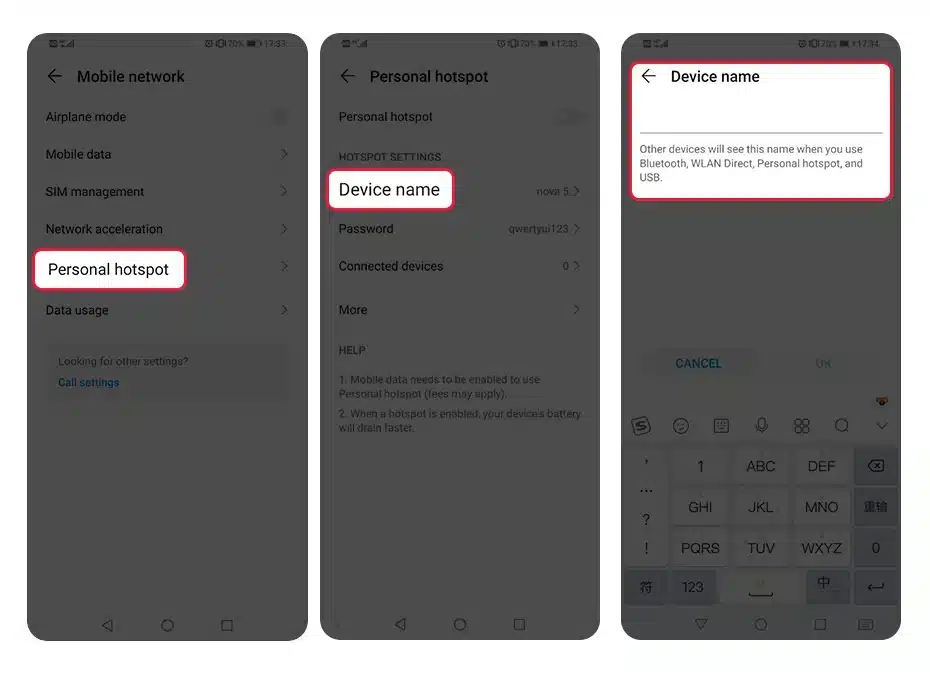 Телефони iOS:
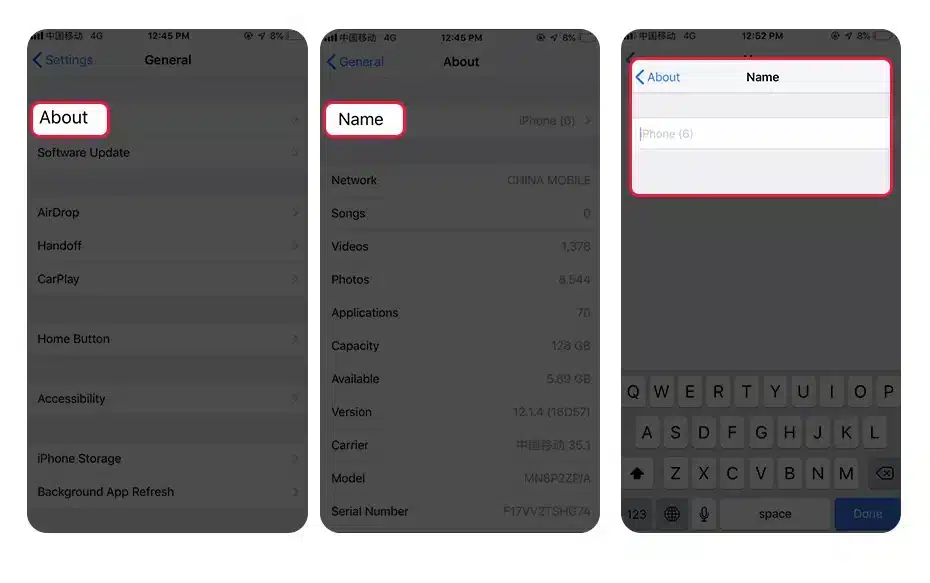 Статус активації через застосунок:
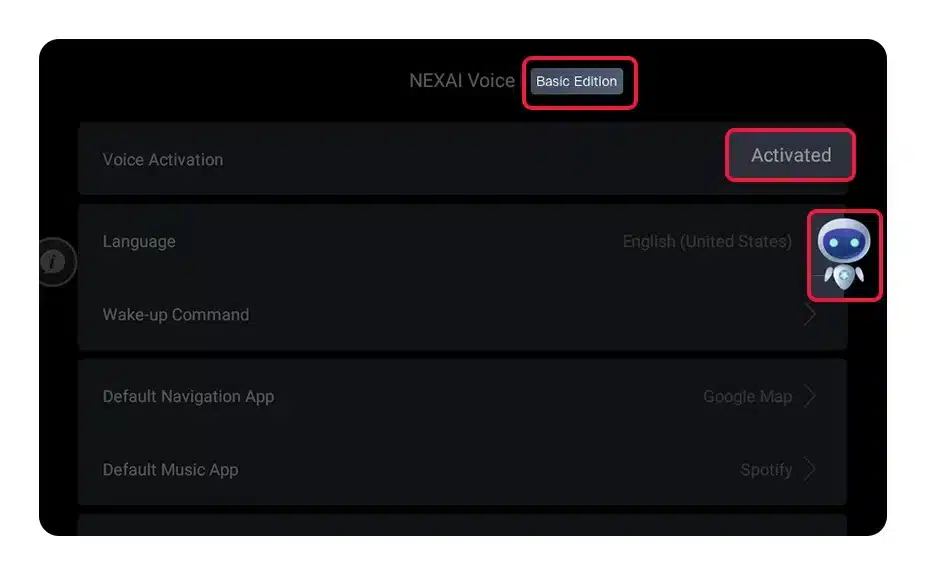
Як перевірити, чи активація пройшла успішно
Після виконання кроків інструкції з активації відкрийте застосунок “Toppal Sound”, щоб перевірити статус активації на сумісних автомобільних головних пристроях Android. У разі успіху функцію голосового керування буде ввімкнено, а панель NEX змінить колір, щоб вказати активний статус.Чому активація може не вдатися
- Перевірте, чи встановлено застосунки “Toppal Service” і “Toppal Voice”. Якщо ні, ваш пристрій може не підтримувати голосове керування.
- Переконайтеся, що назва вашої точки доступу точно збігається з кодом активації (без зайвих пробілів або помилок).
- Перевірте, що ваш телефон має активне підключення до інтернету.
- Якщо під час встановлення виникнуть проблеми або вам потрібно усунути неполадки з активацією Toppal Voice, зверніться до нашого support centre для допомоги.
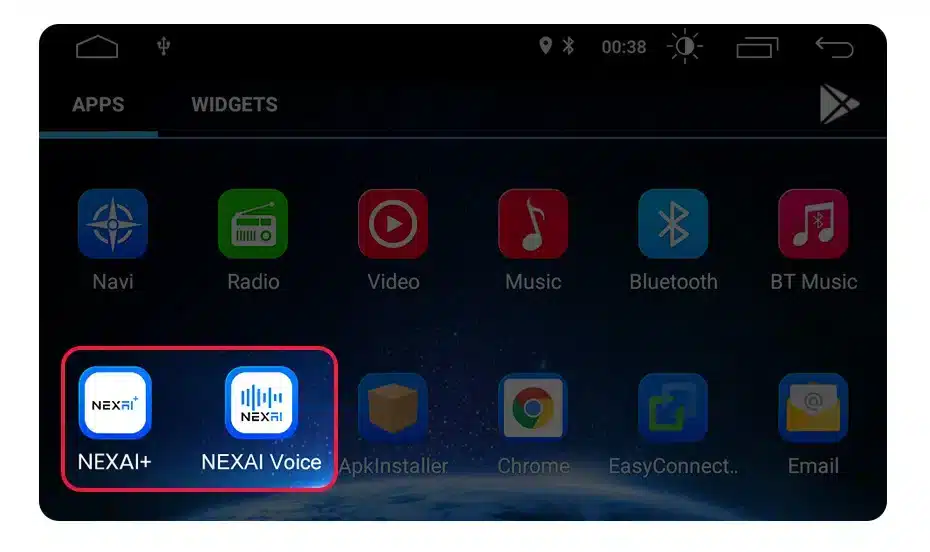
Відеоурок
ПОШИРЕНІ ЗАПИТАННЯ
Can I install this on a non-Android system?
No. Toppal Voice only supports Android-based car head units.Does it work offline?
Yes, basic voice commands like “Play music” or “Volume up” can work offline. However, functions like navigation, weather, or online search require an internet connection.Can the activation code be reused on another device?
No. Each activation code is permanently bound to the device it’s first activated on. It cannot be transferred or reused.Is this a lifetime licence?
The licence is valid for the lifetime of the device, not the user. If you change devices, you will need a new activation code.Internal Resources
- Product Details Page
- Mainboard Compatibility List
- APK Installation Video
- Licensing Terms
- Troubleshooting Centre
